Ask ten support leaders what’s broken about their setup and most of them won’t say “we need better software.” They’ll say something more specific. Agents keep asking customers to repeat themselves. Tickets sit untouched over a weekend. Someone on the team is manually copying order details from one tab to another every single day because the systems don’t talk to each other.
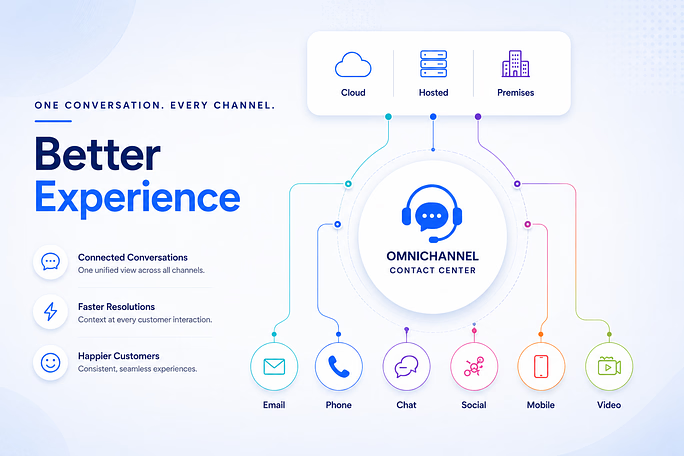
Customer service software is often what helps bring those disconnected processes together, even if nobody asked the question directly. At a basic level, it’s the platform that pulls every channel, voice, email, chat and SMS into one place, automates repetitive support tasks that do not require agent intervention and gives agents the context they need before the conversation begins.
That’s the textbook version. The real reason businesses end up buying this kind of software is almost always more personal than that. A bad quarter. A customer left a one-star review because they had to call back three times. A founder who got cc’d on a complaint that should never have reached them.
For many businesses, customer service software integrates customer support, automation, reporting, and communication channels into a single workflow.
So what does this software actually do day-to-day?
It does three things well, and almost everything else is a variation on these.
First, it routes. A request comes in, and instead of landing wherever there’s an open seat, it goes to whoever’s actually equipped to handle it, based on the issue, how urgent it sounds, or who the customer has spoken to before.
Second, it deflects. A decent chunk of incoming questions, password resets, “where’s my order,” basic how-do-I-do-this troubleshooting, never need to reach a person at all if the self-service tools are built properly.
Third, it remembers. Every email, call, and chat gets logged somewhere everyone can see, so the next agent who picks up the conversation isn’t starting from zero.
None of that sounds revolutionary when written out like this. But take any one of those three away and watch how fast a support team starts to feel chaotic.
Where the automation part actually kicks in
People hear “automation” and picture something cold and robotic, with no human involved. That’s not really what’s happening here, or at least it shouldn’t be.
What’s actually getting automated is the repetitive part of the job. The part nobody went into customer service to do.
Routing happens automatically based on rules someone sets up once, rather than a manager manually monitoring the queue every morning. Repetitive questions get handled by an IVR or a knowledge base before a human ever sees them. If a ticket’s been sitting too long without a reply, the system flags or escalates it automatically, rather than relying on someone to notice.
And increasingly, agents get a suggested reply or a relevant article pulled up automatically, so they’re not digging through three browser tabs mid-call trying to find an answer.
The point isn’t to remove people from support. It’s to stop wasting their time on the stuff that was never really about judgment in the first place, so they’ve got more room to actually help the person on the other end.
Why do response times get faster once this is in place?
Most of the delay in customer support has nothing to do with how fast an agent types or how smart they are. It’s the five minutes spent waiting for a screen to load, or the awkward back-and-forth in which the agent asks a question the customer already answered for someone else last week.
Take that away, and resolution speeds up almost on its own. A request that lands with the right person the first time skips the entire reassignment loop, the part where a ticket bounces between two or three agents before anyone actually owns it. That alone can shave hours off a resolution, sometimes longer.
And every question a self-service tool handles on its own is one less thing sitting in the queue ahead of everyone else. Fewer things in the queue mean the queue itself moves faster. The idea is simple. When fewer routine requests reach agents, queues move faster and response times improve. It may not sound as exciting as AI-powered support, but the impact is often more immediate.
What businesses actually notice once they make the switch
A few things tend to show up fairly quickly, while others take longer.
Resolution speed improves early, often within the first few weeks, mostly because agents stop hunting for context that used to be scattered across systems. Consistency takes a little longer to show up, but matters just as much. Customers stop getting a great experience on chat and a frustrating one on the phone, because both channels are finally pulling from the same playbook.
Managers get something they didn’t really have before, too. Actual visibility into where things slow down. Not a gut feeling that “Mondays are bad,” but real numbers showing exactly where a bottleneck is forming and which team it belongs to.
And maybe the most underrated benefit: support volume can grow without the headcount growing at the same rate, because automation is quietly absorbing the repetitive load that used to require another hire.
There’s a retention piece in here, too, and it’s worth saying plainly. Customers rarely choose a business because of its support team. But they absolutely left because the experience was so bad. A slow response doesn’t just delay an answer; it tells the customer they weren’t a priority. And that’s a hard thing to walk back once a competitor down the road is replying in minutes instead of hours.
What’s actually worth checking before choosing a platform
It’s easy to get distracted by a feature list. The better question is what happens after the contract is signed and the team is actually using it every day.
Does it genuinely pull every channel into one view of the customer, or are they disconnected tools presented as a single platform?
Can someone on the support team adjust a routing rule themselves, or does every small change need a developer and a two-week wait?
Does the reporting show something a manager can actually act on, like repeat contact rate or average time to resolution, or is it just a dashboard full of numbers that look busy but don’t mean much?
And if support volume doubles next year, does the platform grow with it, or does that become a whole new project?
Those questions tend to matter a lot more a year in than anything that looked impressive during the demo.
How Telerain fits into this
Telerain was built on a fairly simple idea: automation should make support easier to run, not harder to understand. Routing, AI-assisted agent tools, and reporting that provide meaningful operational insights all work together across voice, email, chat, and messaging, so teams get faster response times without losing the human context that makes support feel like support and not a ticket factory.
The real test for any platform isn’t how long the feature list is. It’s whether the distance between a customer reaching out and a customer actually getting helped gets shorter.
Frequently asked questions
How does customer service software improve response times?
Customer service software improves response times by routing requests to the right team, centralizing customer information, and automating repetitive tasks. This helps agents spend less time searching for context and more time resolving issues.
Can customer service software reduce support costs?
Yes. By automating routine tasks and improving agent productivity, customer service software helps businesses handle more support requests without increasing headcount at the same pace.
What should businesses prioritize when evaluating customer service software?
Businesses should prioritize ease of use, automation, reporting, scalability, and the ability to unify customer conversations across channels. The right platform should simplify support operations, not add complexity.